 Trust
Hand passwords and files across. Keep everything in your cloud.
Trustferry is a team vault and a secure exchange in one. Your people keep credentials, keys and documents in it; your partners receive exactly what you send them through a link that needs a code from their inbox. Every byte stays in your own S3 bucket or Azure container.
- Encrypted in your cloud
- Scanned for malware
- Partner enters a code from their inbox
- Delivered, and written to the audit log
Two jobs, one tool, your storage
Most companies pay for a password manager and a file-transfer service, and both keep their data on someone else's servers. Trustferry does both jobs inside your cloud account.
A vault for your team
Logins, API keys, tokens and notes, each encrypted with its own key. Organize them by folder and label, and decide who can see each one: everyone, only you, or particular teams.
An exchange for partners
Send items to clients and vendors, or ask them to upload files back. They verify with a code sent to their inbox and see nothing else. Links expire and can be revoked at any time.
Storage you already own
Amazon S3, Azure Blob or local disk. There's no database to run. Files up to 25 GB go from the browser straight to your bucket, and every upload is scanned by the antivirus you already use.
See how it works
These screens come from a working Trustferry for Ideaonix Technologies. Pick a screen to look at.
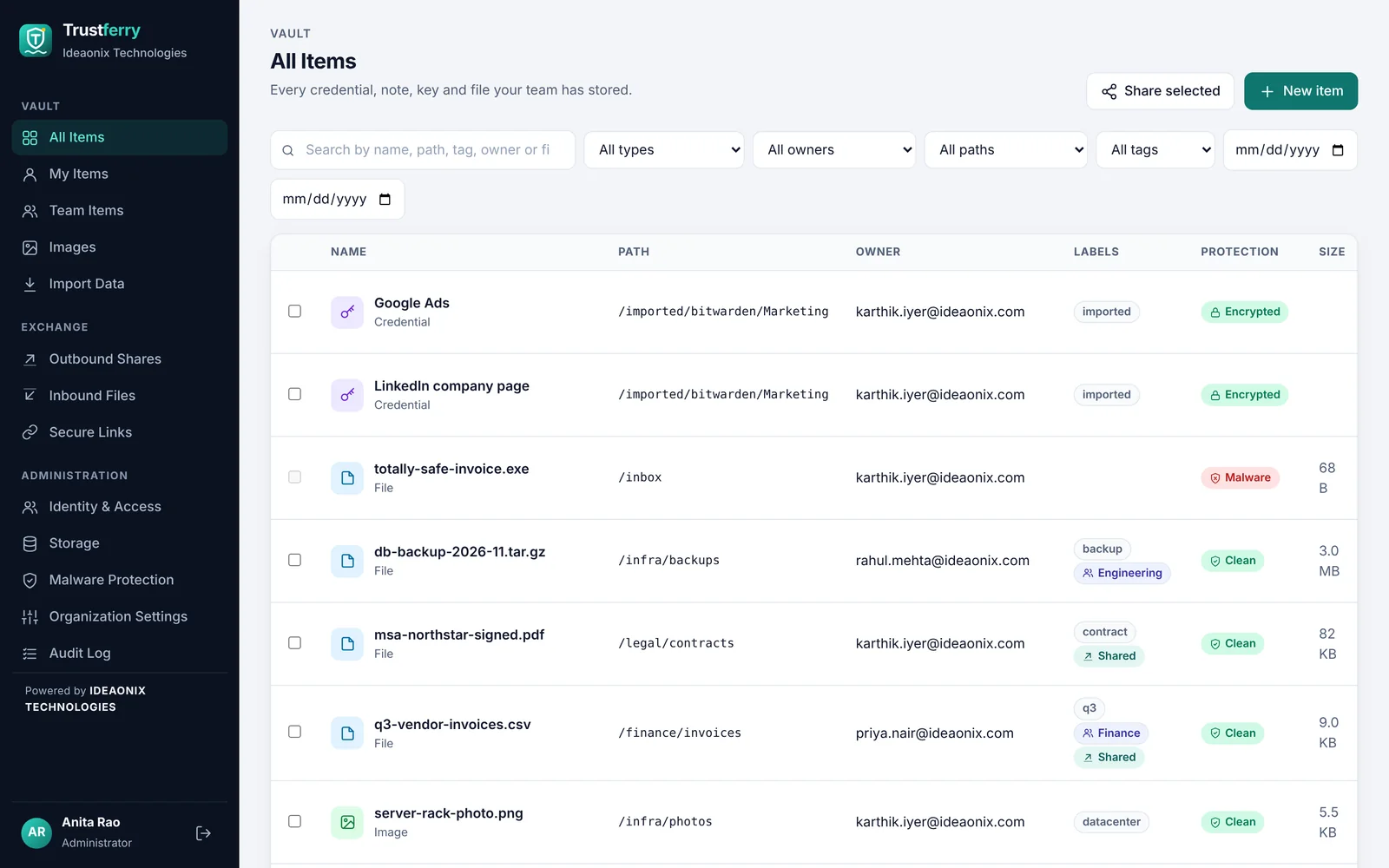
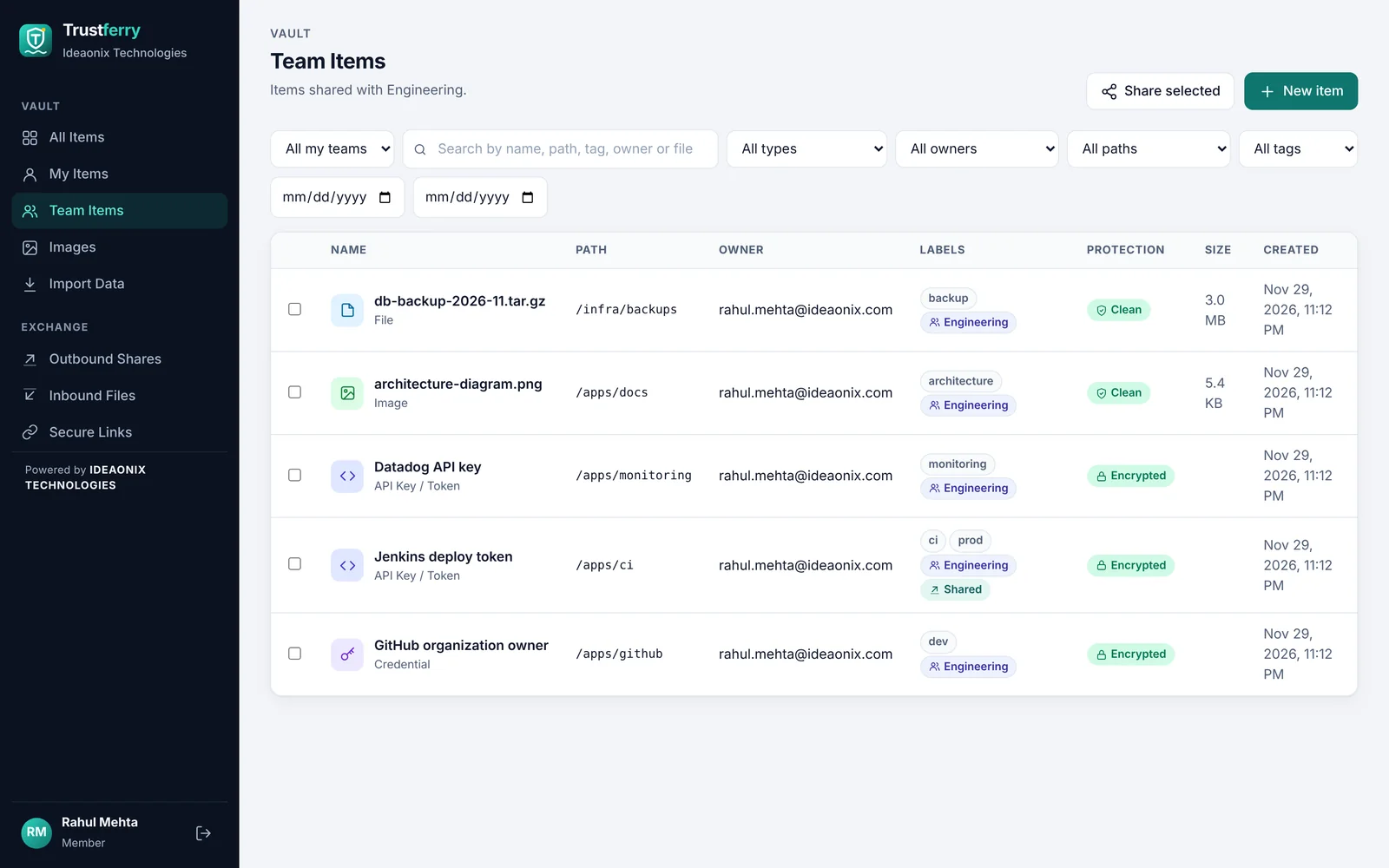
Everything your team stores, in one list
Search by name, folder, label, owner or file name. Each row shows who can see it and whether it's encrypted or scanned. The file flagged as malware can't be downloaded or shared.
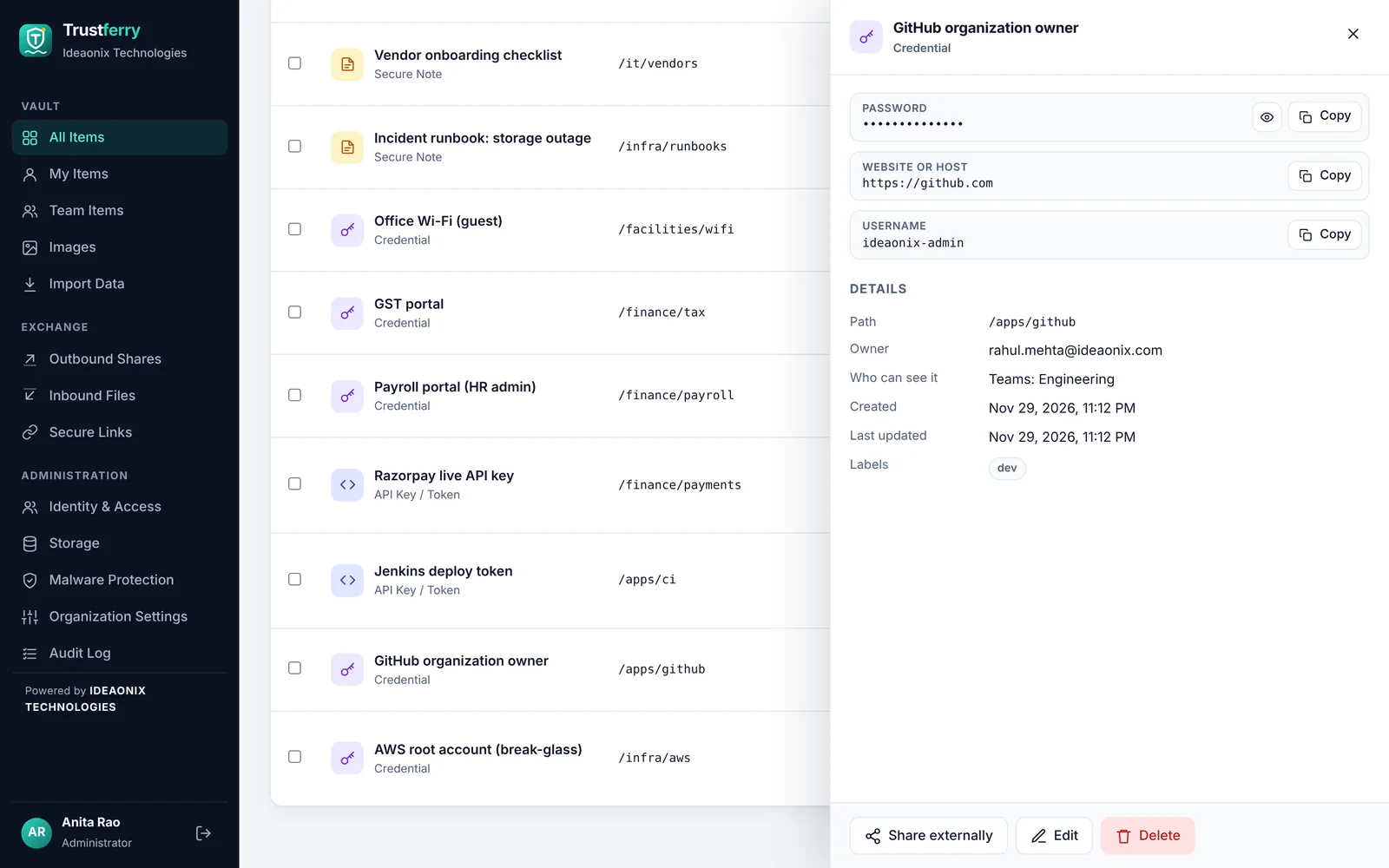
Secrets stay masked until you ask
Open an item to copy a username, reveal a password or download a file. Every reveal and download is written to the audit log with the person and time.
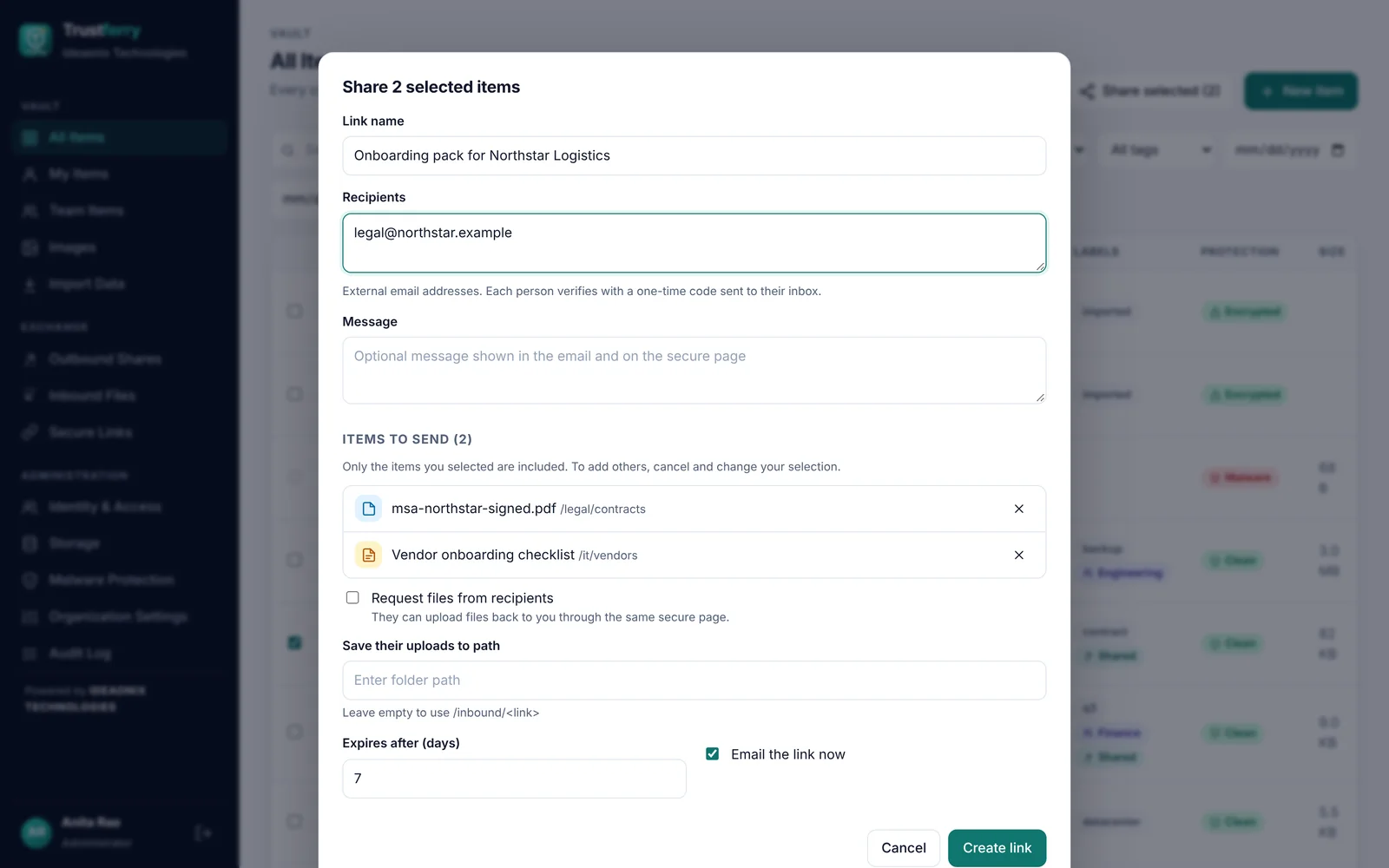
Share exactly what you selected
Tick the items, choose Share selected, and add the partner's email address. Nothing else can slip into the link. Turn on file requests and they can upload documents back to a folder you choose.
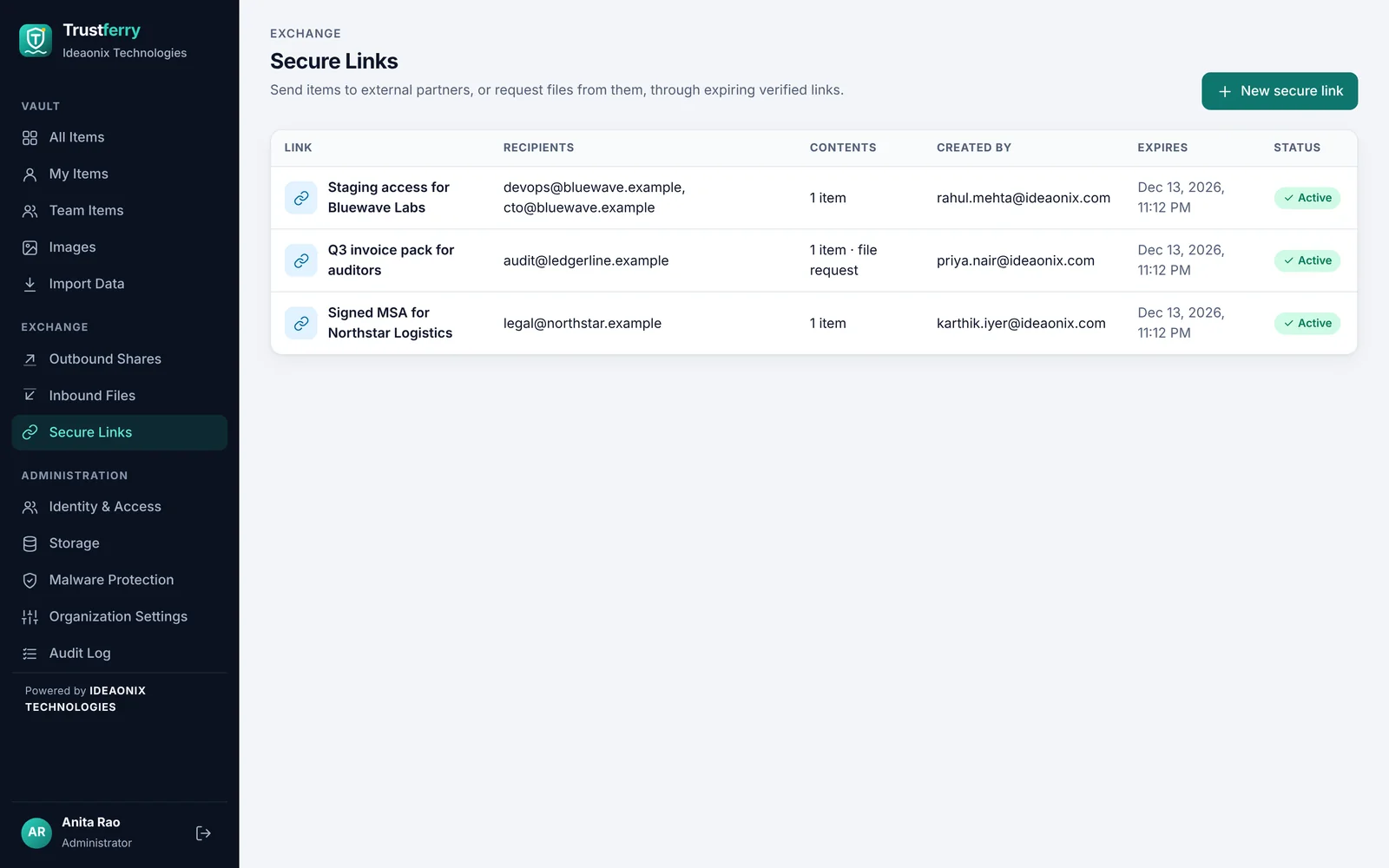
Every link in one place
See who each link went to, what's in it and when it expires. Resend the email, or revoke the link and access ends at once.
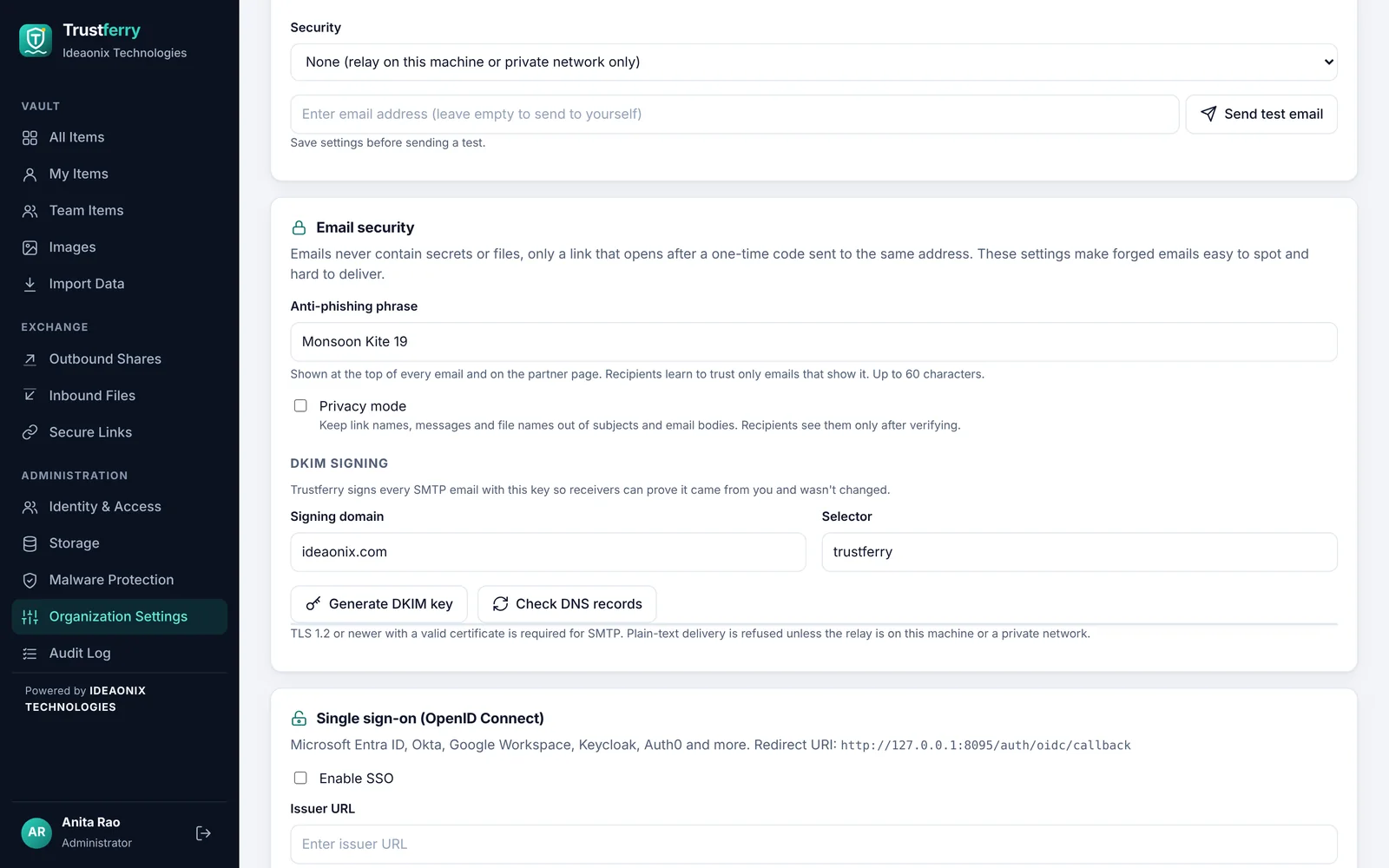
Emails that are hard to fake
Trustferry signs its emails with DKIM, checks your SPF and DMARC records, and puts your security phrase on every message so partners can spot a fake.
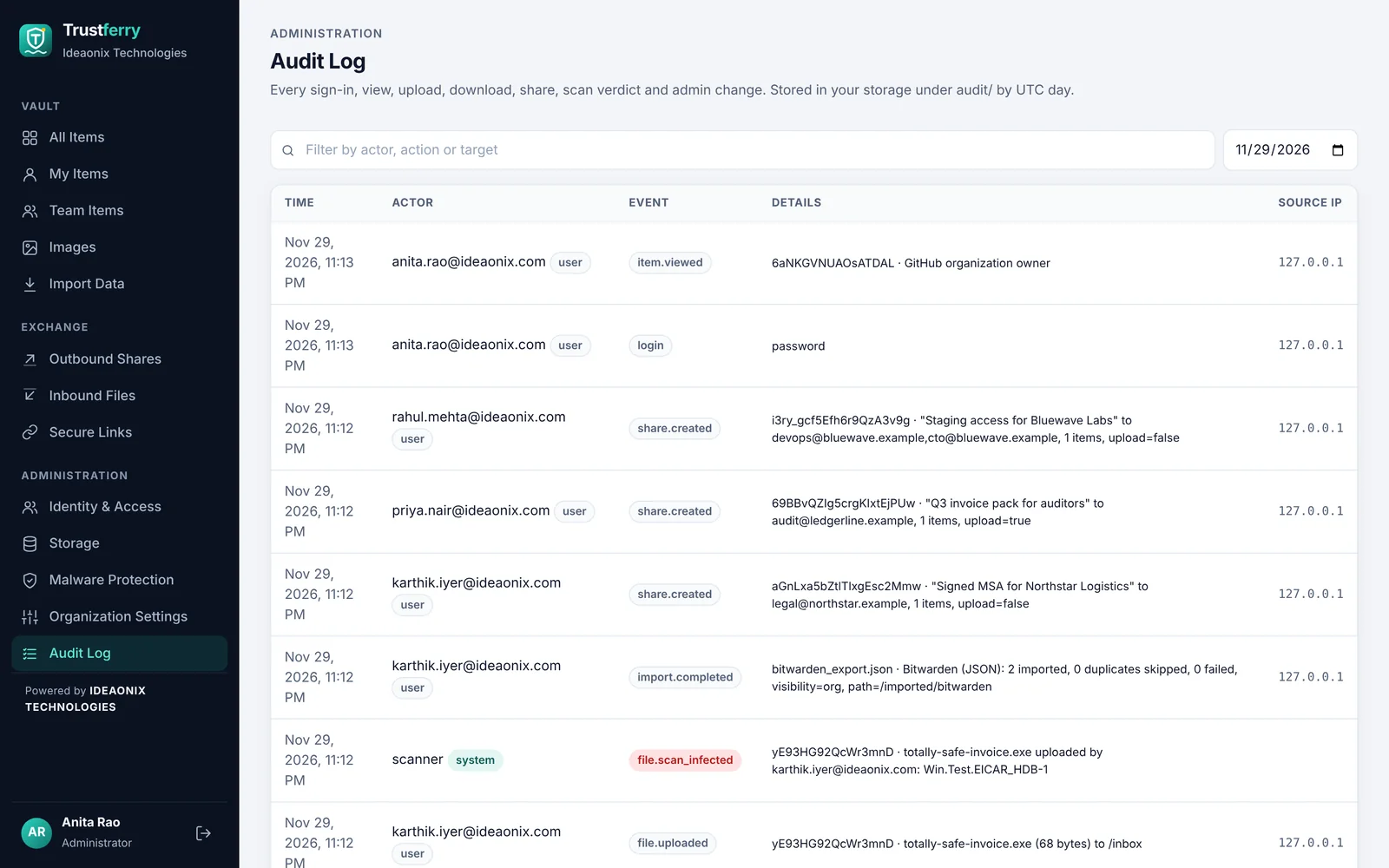
Who did what, and when
Sign-ins, views, downloads, shares, imports and setting changes are each saved as a record in your bucket that can't be edited, ready for your SIEM.
Teams see their own keys, and nothing more
Put people into teams such as Engineering, Finance or Security. When you save a credential or upload a file, choose who can see it.
- Everyone in the organization. Shared Wi-Fi, vendor contacts, common documents.
- Only me. Your own logins. Administrators can still see them for governance.
- Specific teams. The production deploy key goes to Engineering, the payment gateway key to Finance.
Add someone to a team and they see its items straight away. Remove them, and access ends the same moment. Items outside your teams don't appear in lists, searches or filters, and can't be put into a secure link.
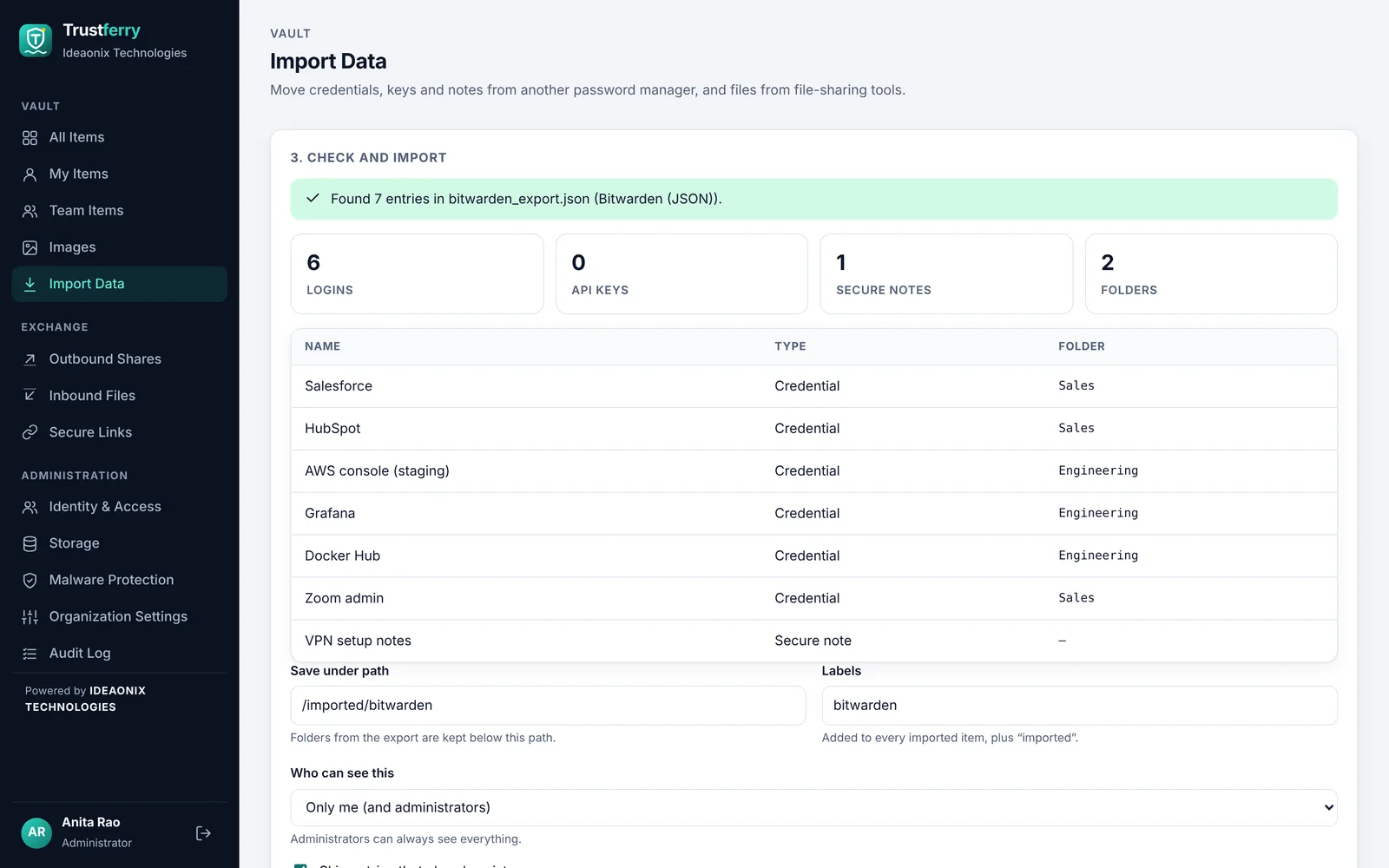
Bring your passwords and files with you
Export from the tool you use today and import the file. Folders become paths, one-time-code secrets and custom fields come along, and duplicates are skipped.
- Export from your current tool. Trustferry shows the exact menu path for each one.
- Preview what was found: how many logins, keys and notes, and which folders. Passwords are never displayed.
- Import into a folder of your choice and decide who can see the items. Each one is encrypted as it's saved; the export file is never stored.
- BitwardenJSON or CSV export
- 1Password1PUX or CSV export
- LastPassCSV export
- KeePass and KeePassXCXML or CSV export
- Chrome, Edge and Bravesaved passwords
- Firefoxsaved logins
- DashlaneCSV export
- Anything elsea CSV with named columns
Files from Dropbox, Google Drive, OneDrive, SharePoint or a file server move in with Upload a folder, which keeps the folder structure and scans every file.
A page your partners can use on any phone
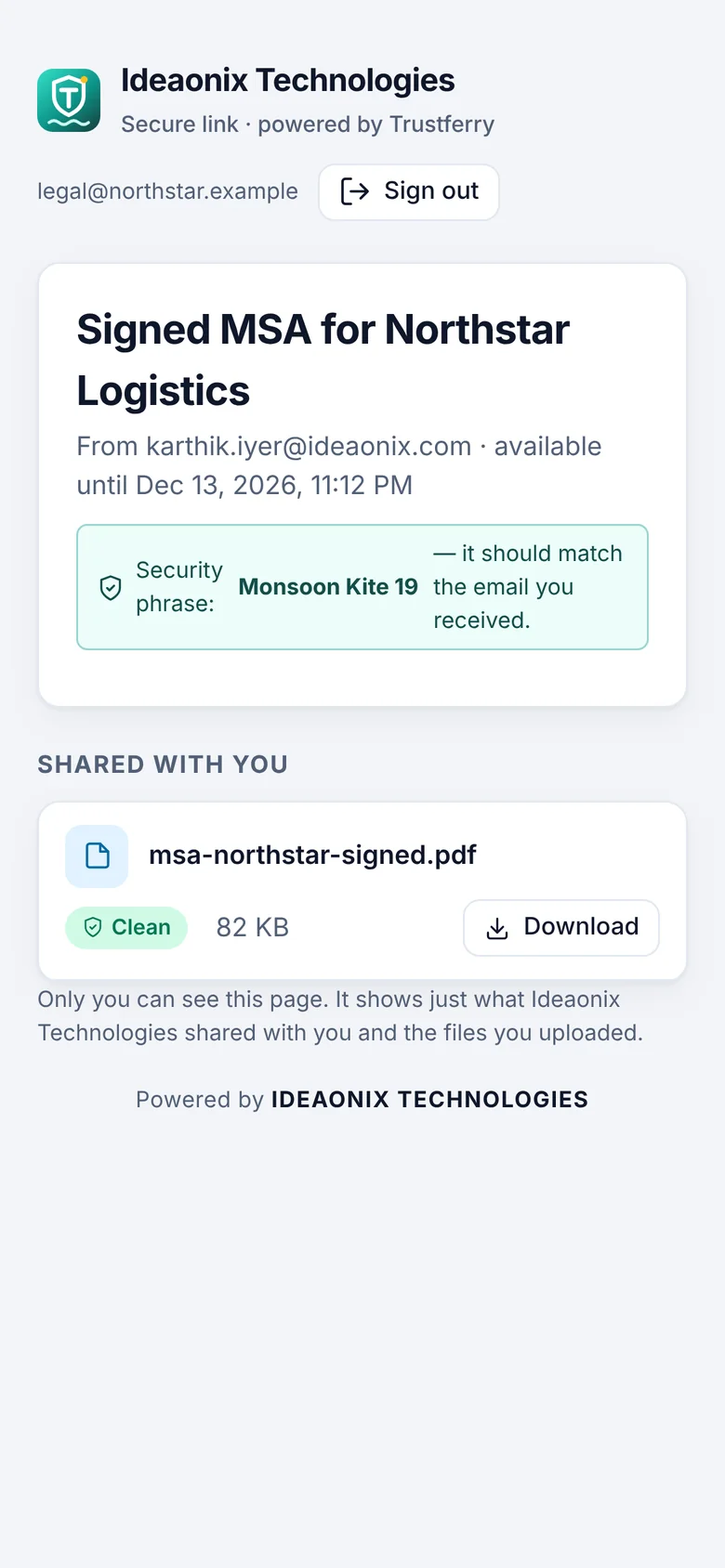
Partners don't need an account. They open the link, type the six-digit code from their inbox, and see your organization's name and security phrase above the items you sent.
- Nothing else is visible. A partner's session is tied to one link and one email address.
- They can send files back. Up to 25 GB, scanned for malware before your team can open them.
- Codes are strict. Ten minutes, five attempts, one use.
Built so a leak gives an attacker nothing useful
Ask what happens when something goes wrong, not only when it goes right.
| If someone gets hold of | What they find |
|---|---|
| A share email | Only a link. Opening it needs a code that is sent to the recipient's inbox, expires in ten minutes and works once. |
| Your storage bucket | Ciphertext. Every secret is encrypted with its own AES-256-GCM key, wrapped by your master key or AWS KMS. Files are protected by the bucket's own encryption. |
| A download link | A signed address that stops working after fifteen minutes, issued only after an access check. |
| A colleague's account | Only what that person could already see. Team and private items stay hidden, and every view is in the audit log. |
| A fake "secure link" email | No security phrase and no valid DKIM signature. With SPF, DKIM and DMARC published, receiving servers reject it. |
| A malicious upload | A quarantined file. Nobody can download or share it, and administrators get an email. |
Single sign-onOkta, Microsoft Entra ID, Google, Keycloak or Auth0 over OpenID Connect, with allowed domains, automatic accounts for new staff and an SSO-only mode.
Two-factor sign-inAuthenticator-app codes for password accounts, and an option to require them for everyone.
Web hardeningHTTP-only cookies, a CSRF check on every change, a strict content security policy, and uploaded HTML or SVG never shown in the browser.
Rate limitsOn sign-in, codes and verification, per account and per address. Only your own load balancer may set the client address.
One small server and your bucket
Trustferry is a single program of about 15 MB with the web app built in. It keeps a fast index in memory and stores everything else in your bucket, so there's no database to run, patch or back up.
Back up two things: the bucket, with versioning turned on, and the master key. Run more than one copy behind a load balancer and they stay in step on their own.
Runs wherever your company already runs
A single server
One command installs Trustferry with automatic HTTPS and ClamAV on Ubuntu. Our reference deployment is a small AWS instance with a private S3 bucket and a role that can reach only that bucket.
AWS ECS Fargate
Terraform creates the encrypted, versioned bucket, the IAM roles, an HTTPS load balancer and the service.
Kubernetes
A Helm chart for EKS, AKS, GKE or your own cluster.
A laptop
One file for Windows, macOS or Linux, to try everything before you roll it out.
StorageAmazon S3, MinIO, Cloudflare R2, Wasabi, Ceph, Azure Blob Storage, local disk. Switch from the admin screen and your data is copied across.
AntivirusSymantec, Trellix, Sophos, Trend Micro, Kaspersky, ESET and Fortinet over ICAP; Microsoft Defender; ClamAV; OPSWAT MetaDefender; VirusTotal; GuardDuty and Defender for Storage.
EmailAny SMTP server, Microsoft 365, Amazon SES, SendGrid, Mailgun, Postmark and Azure Communication Services.
AutomationService accounts with API tokens, for backup jobs, pipelines and scripts that need a secret.
Tested like an attacker would use it
Every release runs through automated tests before it ships, on local disk, Amazon S3 and Azure, and again on a live server over the internet.
| 270 | checks in an offline lab with a fictional company: sign-in and two-factor, roles, the vault, files, every antivirus engine and email service, and attacks such as CSRF, stored XSS, brute force and a forged mail server. |
| 193 | checks for teams, migration from eight tools, single sign-on through an Okta-compatible provider with forged and expired tokens, and encryption at rest. |
| 97 | browser cases through the real interface, including accessibility scans against WCAG 2.1 AA in light and dark mode. |
| 332 | checks across local disk, S3 and Azure storage, every antivirus integration and email provider. |
Ways to run Trustferry
Talk to us about pricing for your organization.
Community
For small teams that run it themselves.
- Vault, files and secure links
- ClamAV scanning and SMTP email
- Your own server and storage
Business
For companies that want it managed or supported.
- Teams, single sign-on and migration
- Every antivirus engine and email service
- We can run a dedicated instance for you
Enterprise
For regulated and larger organizations.
- AWS KMS keys and SIEM integration
- Help with security reviews and audits
- Agreed support response times
Questions people ask
Where is our data stored?
In the storage you choose: your Amazon S3 bucket, your Azure Blob container or a disk on your server. Trustferry and IDEAONIX TECHNOLOGIES never hold a copy.
Can our administrators read everyone's passwords?
Administrators can see every item, so the organization never loses access when someone leaves. Each time anyone opens a secret it is recorded in the audit log with their name and the time.
Do partners need an account?
No. They open the link and type the code sent to their email address. They only see what was put in that link, and can upload files back if you allowed it.
How do we move from our current password manager?
Export from it, then use Import Data. Bitwarden, 1Password, LastPass, KeePass, Dashlane and browser exports are recognised, and any CSV with named columns works too. Delete the export file afterwards.
Does it work with Okta or Microsoft Entra ID?
Yes. Add Trustferry as an OpenID Connect web application in your identity provider, paste the issuer, client ID and secret into Organization Settings, and choose which email domains may sign in.
What does it need to run?
A small Linux server or container with about 512 MB of memory, a bucket or disk, and an email service. Antivirus is optional but recommended.
See Trustferry with your own data in mind
We'll walk through teams, partner links and migration from the tools you use today, and help you plan where to run it.